
A calculator for your site that sends the lead to you.
Right now, if someone on your site wants to run a mortgage payment, a coverage estimate, or a retirement projection, they leave to do it somewhere else — and you never hear about it. This puts one of our 147 calculators on your site instead, as a branded, embeddable calculator with your logo and colors, and sends the visitors who ask for help straight to your dashboard and inbox.
- See live demos →
- Mortgage & loan widget →
- All calculator widgets →
- Install guide →
- Credit unions & banks →
- Financial advisors →
- Brokers & realtors →
Built by the team behind wearecalculator.com, checked against IRS, CFPB, and SSA data — see the standard at wearecalculator.com/sources.
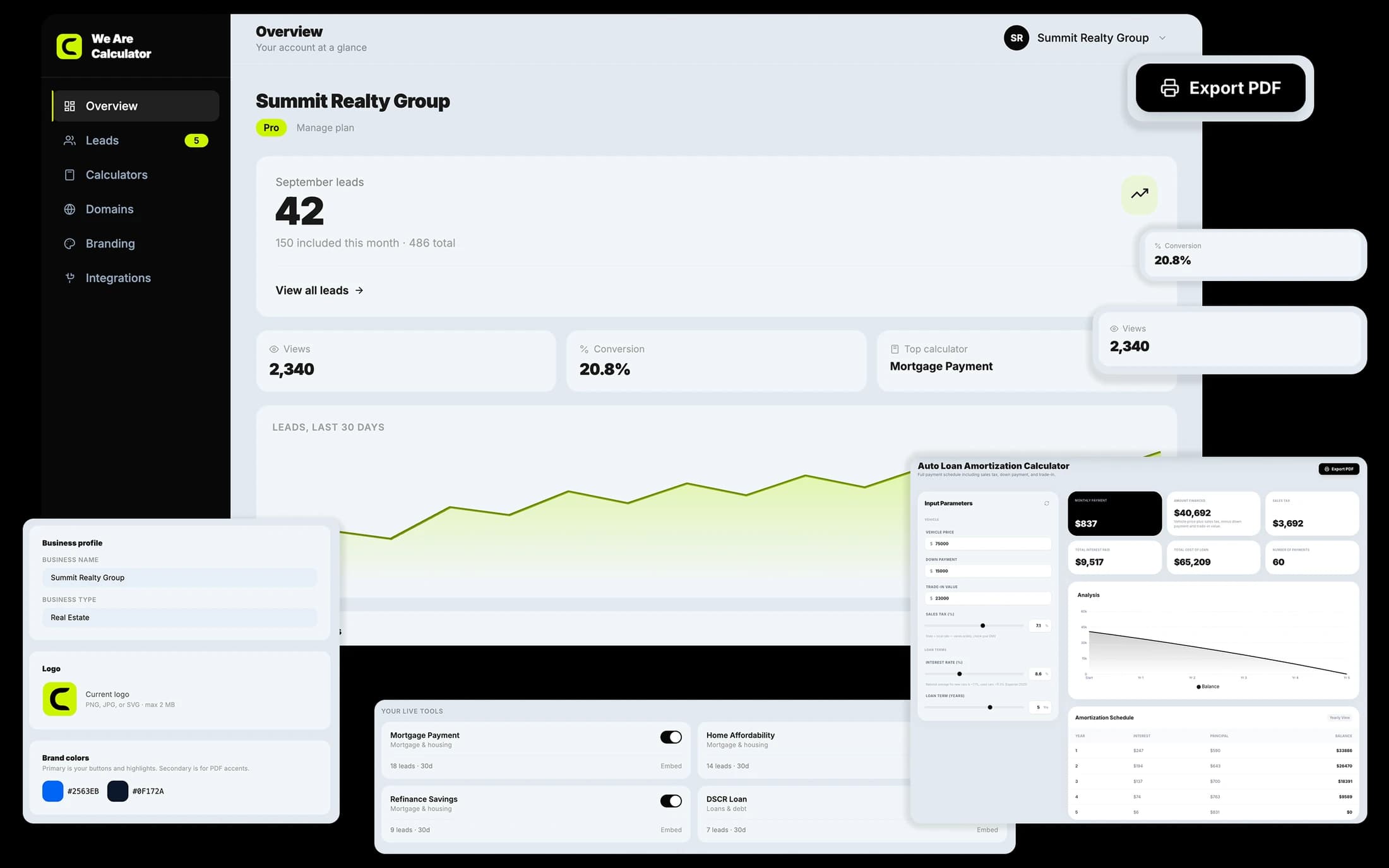
Everything in one place
Leads, branding, and every calculator you've enabled — all in the dashboard that comes with your account, live from day one.
How it works
Most businesses are live in under ten minutes. If you can paste a YouTube video into your site, you can add a calculator.
Step 1: Create your free account
Sign up with your business name. No approval wait and no sales call.
Step 2: Pick calculators and add your branding
Choose the calculators that fit your business and add your logo and colors in the dashboard.
Step 3: Copy and paste one piece of code
Copy the embed code from your dashboard and paste it into any page of your site. No developer needed.
Step 4: Leads arrive where you work
Every completed calculation reaches your dashboard and inbox, and can also go to a webhook, HubSpot or Zapier.
The code you paste
Your dashboard gives you the exact code for each calculator, with your account ID already filled in. It looks like this:
<iframe src="https://wearecalculator.com/embed/advanced-mortgage-calculator?client=YOUR-ACCOUNT-ID" width="100%" height="760" style="border:0;" title="Mortgage calculator" class="wac-embed" loading="lazy"></iframe>Where to paste it
WordPress
Edit the page, add a Custom HTML block, paste the code and update the page.
Webflow or Shopify
Webflow: drag in a Code Embed element and publish. Shopify: add a Custom Liquid section and paste the code.
Squarespace
Add a Code block to the page, paste the code and save.
Any other site (HTML)
Paste the code where you want the calculator to appear in your page's HTML.
Want a walkthrough for a mortgage or loan calculator? See the full install guide.
What you get

Your brand, no ads
Your logo and colors on every calculator, and no ads. A small "Powered by We Are Calculator" credit sits at the bottom of each embed on every plan.

Leads come to you
Visitors see their result first. When one sends the form under it, the lead shows up in your dashboard and is emailed straight to your inbox, not ours, with the numbers they ran.
Live in minutes, not weeks
One line of embed code. No build, no design work, no waiting on a developer.
The same math, verified
Calculators that implement an official rule are checked against the IRS, CFPB, SSA or other issuing authority and show that source — the same standard the public site holds itself to. See wearecalculator.com/sources.
A real dashboard
See every lead as it comes in and manage your branding, all from your own dashboard, live today.
Your own domain, if you want it
Connect a custom domain so the calculator experience feels like part of your site end to end, not a third-party widget.
Leads go where you already work
When a visitor sends the form under their result, the lead is delivered straight away to your dashboard and inbox, and to your own webhook, HubSpot or Zapier if you connect one. Each lead carries the visitor's inputs and result, so you don't need another system to check.

- Email: Gmail, Outlook or any inbox, with the PDF report
- Webhook: Post each lead to your own system
- HubSpot: Leads land as HubSpot contacts
- Zapier: Send leads on to the rest of your tools

Calculators to choose from
You pick which ones make sense for your business — a mortgage broker doesn't need the retirement suite, an advisor doesn't need PMI. All 9 categories:
Browse the full library at wearecalculator.com.
Who it’s for
Any business whose customers make a money decision on its website. These are the ones we built pages for.
- Credit unions and banksMortgage, auto, HELOC, CD, savings and debt calculators, grouped by the decision a member is making.
- Financial advisorsRetirement, RMD, Social Security and Roth vs Traditional IRA calculators, with a link to your booking page.
- Mortgage brokers and realtorsFull monthly payment with taxes, insurance, PMI and HOA, plus affordability, refinance, FHA and VA.
- Insurance agenciesLife insurance needs and other protection calculators from the Insurance category, under your logo.
- Accountants and tax preparersIncome tax, paycheck and self-employment calculators that follow IRS figures for the current tax year.
- Any other siteBrowse every calculator you can embed and pick the ones your visitors ask about.
What you can customize
All of this is set in your dashboard, with no code. The math is the one thing you can’t change.
- Logo and colorsYour logo plus primary, secondary and background colors on every calculator.
- Form wordingThe heading above the form, the button text and the thank-you message.
- Your disclaimerYour own disclosure text, shown to the visitor and saved with each lead.
- Phone fieldOptional, required or hidden.
- Booking linkA button to your calendar after a visitor sends their results.
- Contact form on or offSwitch the form off for any calculator so it shows results only.
- Export PDF buttonShow or hide the PDF download on your embeds.
- Lead retentionKeep leads until you delete them, or erase them automatically after 30 days to 2 years.
How we check the numbers
A calculator on your site carries your name, so it has to be right. This is what stands behind each result.
- Primary sourcesTax brackets, contribution limits, RMD tables and similar figures come from the IRS, SSA, CFPB and other issuing bodies, listed on our sources page.
- A public changelogEvery change to a figure, a formula or a policy is dated and published, including corrections.
- A written standardOur editorial policy says how figures are checked and updated, how we use AI, and who is accountable: Robinjit Singh, the founder.
How we compare with the other ways to add a calculator
There are four common routes. Each suits a different business, and some are stronger than us in places.
| Free widgets with a link back | Calculator builders | Licensed calculator suites | We Are Calculator | |
|---|---|---|---|---|
| Examples | Free embed codes from calculator sites | Calconic, Outgrow, involve.me | Dinkytown, CalcXML, Fintactix | This page |
| Price model | Free; a visible link or credit to the provider is usually required | Monthly subscription | One-time licence, annual licence or a quote, often by number of calculators or institution size | Free plan, or $89 USD a month for 5 calculators |
| Who builds the calculator | Ready-made | You build it from a template and maintain the formulas | Ready-made | Ready-made: 147 calculators |
| Lead capture | Usually none | Yes | Varies; an add-on with some vendors | Included on every plan, and can be switched off |
| Your branding | Usually the provider's | Yours | Yours | Your logo and colors, with a small “Powered by” credit |
| Track record with banks | Not their market | Not their market | Long; some publish accessibility conformance statements | New. No institutional customers yet and no independent accessibility audit |
Compiled November 14, 2026 from each provider's public pages. Offers change, so check the vendor's own site before you decide.
Pricing
One flat monthly price with 50 leads included. Need more? Add a lead pack. No setup fees, cancel any time.
Free
$0
Free forever. No card required.
- 1 active calculator
- 1 website
- 10 leads per month
- Never lose a lead: extra leads are saved and wait for you
- Your logo and brand colour
- Lead emails with PDF report
- Email, webhook, HubSpot + Zapier delivery
Starter
Most popular$89 USD/month
Billed monthly. Cancel any time.
- 5 active calculators
- 1 website
- 50 leads included, reset each month on your billing date
- Need more? Lead packs from $25 USD
- Never lose a lead: extra leads are saved and wait for you
- Your logo and brand colour
- Lead emails with PDF report
- Email, webhook, HubSpot + Zapier delivery
- Priority email support
Enterprise
Custom
Custom limits and invoice billing.
- Custom calculator and lead limits
- Multiple websites
- Custom calculators
- Invoice billing
- Dedicated support
Lead add-on packs
For Starter. Used only after your 50 included leads run out, and they never expire.
+25 leads
$25 USD
$1.00 USD per lead, one-time
+100 leads
$79 USD
$0.79 USD per lead, one-time
+500 leads
$299 USD
$0.60 USD per lead, one-time
Prices in USD. You're never billed for extra leads automatically; packs are only charged when you buy one. See what counts as a lead.
Questions you might have
What does this cost?
Free is $0 forever: 1 calculator, 1 website and 10 leads a month, no card required. Starter is $89 USD/month for 5 calculators and 50 leads a month, billed monthly. Need more leads? Add a one-time lead pack: +25 leads for $25, +100 for $79 or +500 for $299 (USD). Pack leads never expire. Enterprise is custom — contact us. No setup fees, cancel any time.
What happens when I hit my monthly lead limit?
We email you at 80% and again at 100%. After that, new leads are never turned away: they're saved but locked. You see that someone is waiting, and their details unlock oldest first when you add leads (a lead pack on Starter, or upgrading from Free) or automatically when your allowance resets each month (Starter: your billing date; Free: your signup date). You're never charged automatically.
What counts as a lead?
A visitor who submits the form under your calculator with a working email. Each email counts once per month, bot and junk submissions are blocked before they reach you, and you can report any lead that isn't real. The full rules are on the "What counts as a lead" page linked below.
Is it accessible?
We aim for WCAG 2.2 AA. On October 20, 2026 we tested the embed on six calculators with an automated axe-core scan and keyboard-only checks, and fixed what we found. There has been no independent audit yet. Our accessibility statement lists what was tested and the known limits.
Who is this for?
Businesses whose customers make money decisions on their website: mortgage brokers and lenders, financial advisors, insurance agencies, real estate businesses and similar. Choose from 147 calculators across mortgage, loans, retirement, savings, taxes, insurance, real estate investing and business finance, put your branding on them, and visitors who want help send you their results as a lead.
How is this different from a calculator builder?
A calculator builder gives you a blank canvas: you design the inputs and write and maintain the formulas yourself. We Are Calculator gives you finished financial calculators whose math we maintain and check against the issuing authority (IRS, CFPB, SSA and others, shown on each calculator), so you brand and embed them instead of building them. If you need something we don't have, custom-built calculators are available on Enterprise.
Which website platforms does it work on?
Anywhere you can paste HTML. The install panel has step-by-step guides for WordPress, Squarespace, Webflow, Shopify and plain HTML. Wix and GoDaddy Website Builder are not supported yet, because those builders load custom code from an address our domain protection blocks.
Is this live right now?
Yes — sign up and you can have this embedded on your own site today. No waitlist, no approval process.
How do I add a calculator to my website?
It's one embed snippet, the same way you'd add a YouTube video or a booking widget. No developer needed — if your site can paste HTML, it can run this.
Is this a white-label calculator?
Not fully. Your logo and brand colors appear on every calculator and there are no ads. Every plan also shows a small "Powered by We Are Calculator" credit at the bottom of the embed. Custom-built calculators are available on Enterprise.
What happens to visitor data?
Nothing is sent while a visitor uses the calculator. They see their result first. If they choose to send the short form under the result, their details and what they entered are saved as a lead for you only, in your dashboard and inbox. We don't use leads for anything else. The data handling page has the details.
Can I cancel any time?
Yes. Starter is billed monthly with no contract or setup fee, and you can cancel from the billing page. You keep Starter until the end of the month you paid for, then move to the Free plan, which never expires.
Can visitors use the calculator without giving their contact details?
Yes. The result shows straight away and nothing is sent to us while they calculate. Contact details reach you only if a visitor fills in and sends the form under the result. You can also switch the contact form off for any calculator, so it shows results only.
Where is lead data stored, and can I delete it?
Leads are stored in our database in the United States (Supabase, Oregon region) and sent over HTTPS. You can delete any single lead from your dashboard, set leads to be erased automatically after 30 days to 2 years, export them as CSV, or delete your whole account. We never sell lead data or use it to contact your visitors.
Do you have a SOC 2 report, an uptime SLA or a VPAT?
Not today. We don't hold a SOC 2 report, publish an uptime SLA or have an independent accessibility audit. What we can share is on the data handling page and the accessibility statement, and you can email us for a written summary to give your IT or compliance team.
Do the calculators use US or Canadian rules?
US rules. Tax, retirement and mortgage calculations follow US federal and state sources such as the IRS, SSA and CFPB, and amounts are in US dollars. They don't apply Canadian tax or mortgage rules.
What can I change on the calculator?
Your logo, three brand colors, the form heading and button text, your disclaimer, whether the phone field is optional, required or hidden, the thank-you message, an optional booking link, the Export PDF button, and whether the contact form shows at all. The calculation itself can't be edited, because it is checked against official sources.
Can I track calculator use in Google Analytics?
Yes. The embed sends four events to your page (view, started, lead submitted and PDF downloaded) to Google Tag Manager and GA4. No visitor details are included in those events.
Didn't find your answer? Email Robinjit or book a demo.

Ready to try it?
Create your account and embed your first calculator within minutes. A free plan is available, no credit card needed.
Get startedSee what counts as a lead, our accessibility statement, the data handling details, our Terms, the License Agreement and Privacy Policy.
Already a customer? See Help & FAQ.
Questions before signing up? Reach out via the contact page.